

Where to Find Payment Rules
- Log in to your RabbitPay Dashboard.
- Open RTO Suite from the left sidebar.
- Scroll to the Payment rules section.
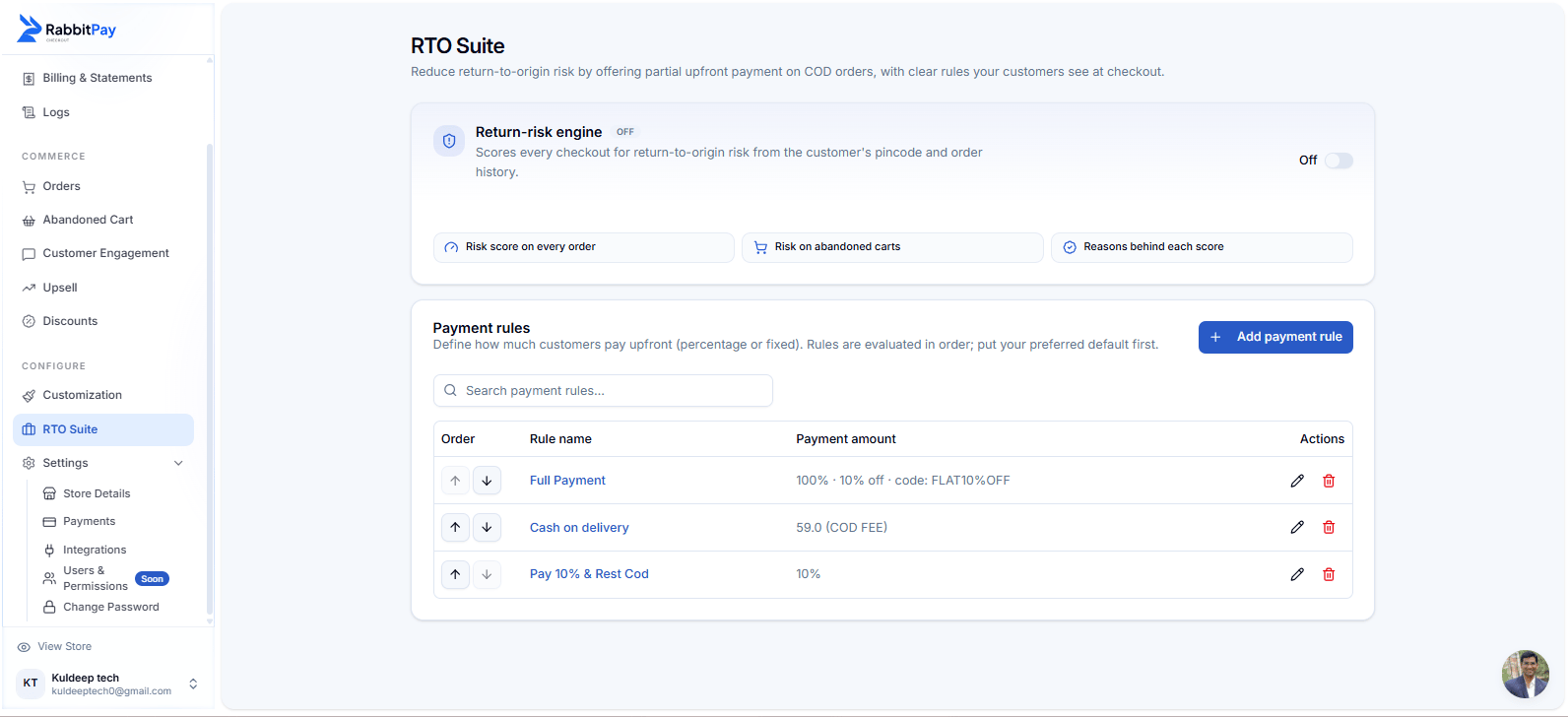
Payment rules in RabbitPay RTO Suite.
How Payment Rule Priority Works
Each payment rule has two controls:- ↑ Up — Move the rule higher in the list and give it higher priority.
- ↓ Down — Move the rule lower in the list and give it lower priority.
The rule at the top has the highest priority. Rules below it are evaluated after the rules above them.
Step 1: Move a Payment Option Up
If you want a payment option to have higher priority:- Find the payment rule you want to prioritize.
- Click the ↑ Up button.
- The rule moves one position higher.
- Continue clicking ↑ until it reaches the position you want.
Step 2: Move a Payment Option Down
If you want a payment option to have lower priority:- Find the payment rule you want to move down.
- Click the ↓ Down button.
- The rule moves one position lower.
- Continue clicking ↓ until it reaches the required position.
Example
Suppose your payment rules are arranged like this:
Here, Full Payment has the highest priority because it is at the top.
If you move Cash on delivery above Full Payment, the order becomes:
The payment rules are now evaluated in this new order.
Step 3: Save Your Changes
After arranging the payment rules:- Review the order of your rules.
- Make sure the preferred rule is at the top.
- Save the changes if RabbitPay displays the save option.
- Test your Shopify checkout to verify the result.
Your payment-rule priority is updated successfully when the rules appear in your preferred order in RTO Suite.
Result at Shopify Checkout
The priority you configure in RabbitPay determines how eligible payment options are presented through the checkout flow. For example, if Full Payment is placed above Cash on delivery, customers eligible for both options will see the prepaid option prioritized accordingly.Why Control Payment Option Priority?
Promote Prepaid Payments
Place your full-payment rule higher to prioritize prepaid orders and encourage customers to pay online.
Reduce COD Risk
Give prepaid or partial-payment rules higher priority to reduce dependency on cash-on-delivery orders.
Flexible Payment Strategy
Arrange payment rules based on your store’s payment and RTO strategy.
Simple Rule Management
Change payment priority directly from RTO Suite without modifying your Shopify theme.
Quick Summary
↑ Move Up Higher position → Higher priority → Evaluated earlier. ↓ Move Down Lower position → Lower priority → Evaluated later.Keep your preferred default payment rule at the top of the list so it receives the highest priority.