> ## Documentation Index
> Fetch the complete documentation index at: https://rabbitpay.ai/documentation/llms.txt
> Use this file to discover all available pages before exploring further.
# How to Configure Zipcode Restrictions
> Restrict payment rules for selected delivery zipcodes or zipcode ranges in RabbitPay.
Use Zipcode Restrictions to apply or hide a payment rule for selected delivery zipcodes or zipcode ranges.
***
## Step 1: Open RTO Suite
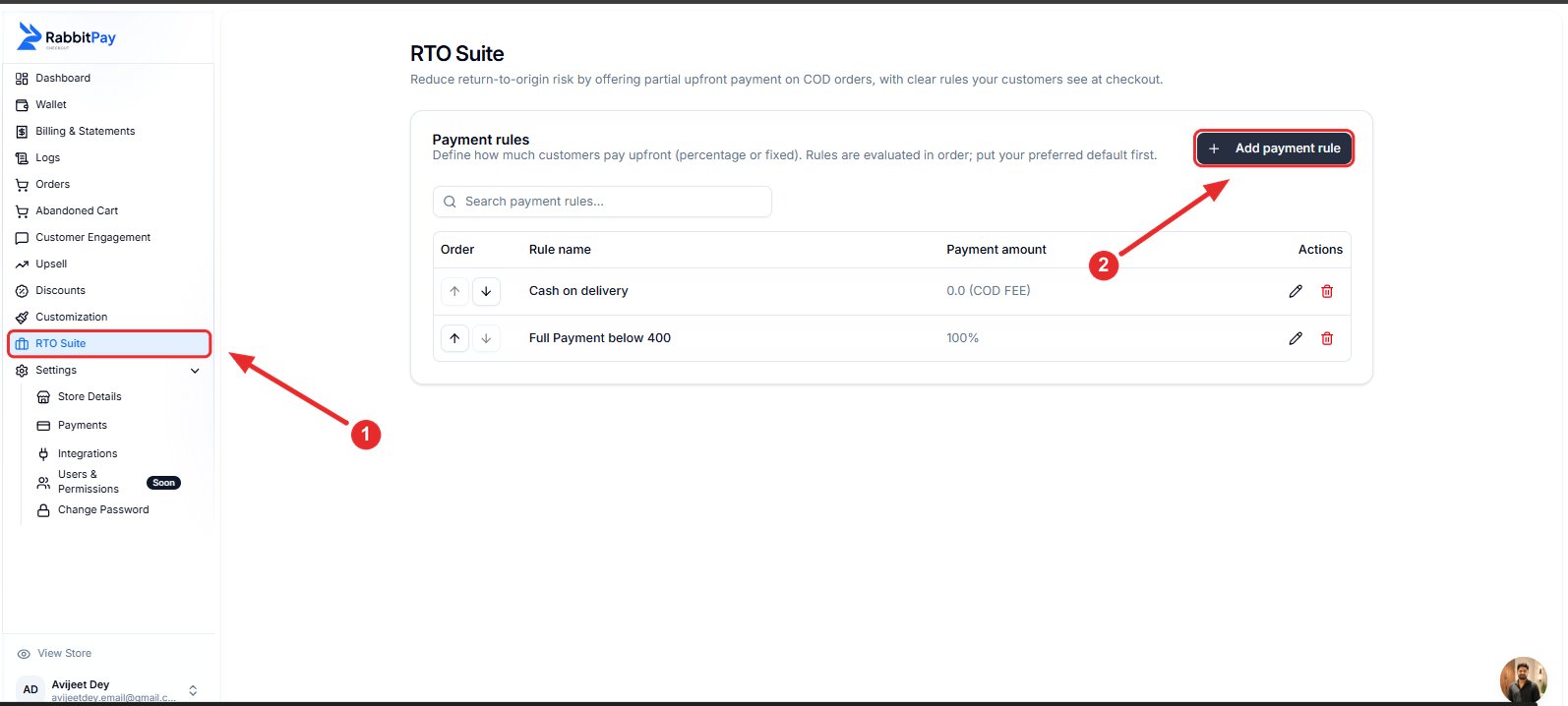
1. Log in to your RabbitPay Dashboard.
2. Navigate to **RTO Suite**.
3. Click **Add payment rule** or edit an existing payment rule.
 ***
## Step 2: Configure the Payment Rule
Configure the payment rule based on your requirement.
| Field | Value |
| ----------- | ---------------------------------------------- |
| Rule Name | Enter a customer-friendly rule name |
| Amount Type | Percentage, Fixed Amount, Full Payment, or COD |
| Amount | Configure according to your payment rule |
***
## Step 2: Configure the Payment Rule
Configure the payment rule based on your requirement.
| Field | Value |
| ----------- | ---------------------------------------------- |
| Rule Name | Enter a customer-friendly rule name |
| Amount Type | Percentage, Fixed Amount, Full Payment, or COD |
| Amount | Configure according to your payment rule |
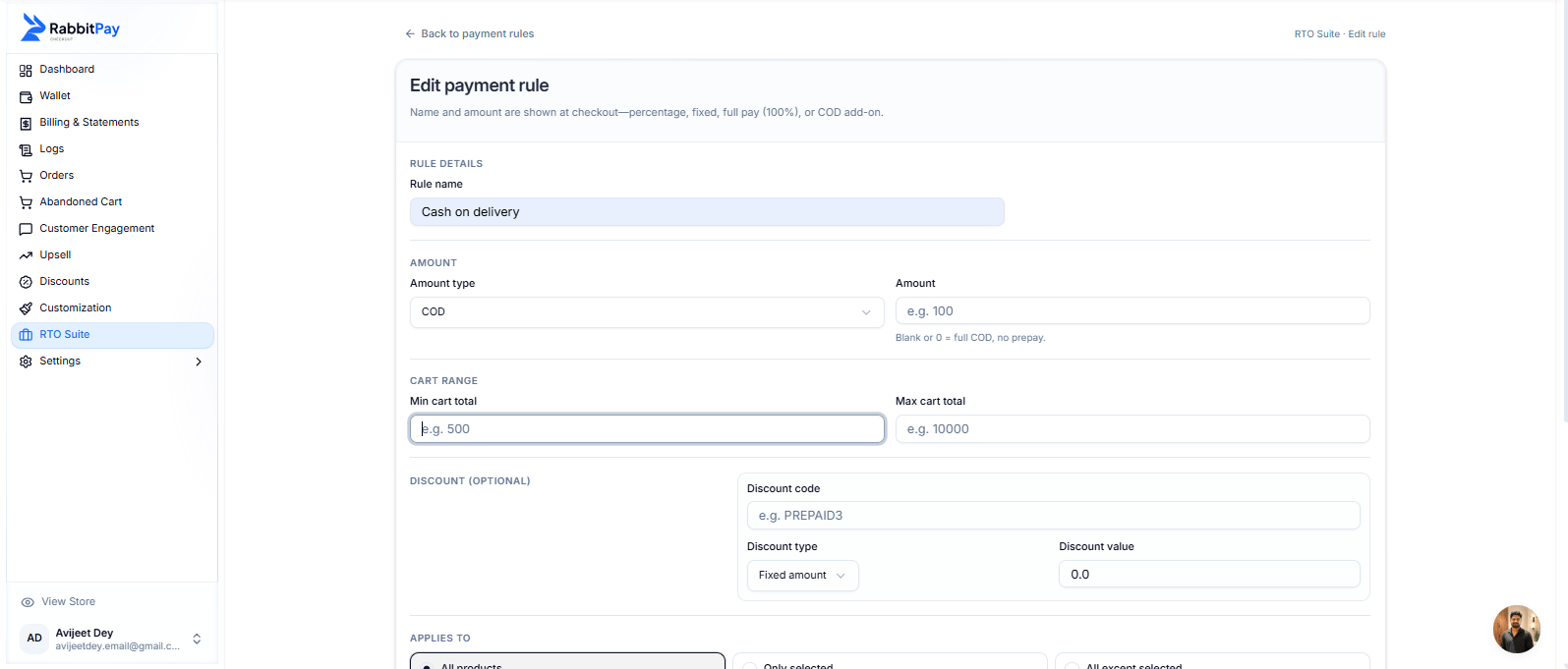 > **Note:** In this guide, **Cash on Delivery (COD)** is used as an example. Zipcode Restrictions work with any payment rule.
***
## Step 3: Enable Zipcode Restrictions
Scroll down to the **Zipcode Restrictions** section.
1. Enable **Zipcode Restrictions**.
2. Enter the zipcodes where you want this payment rule to be restricted.
> **Note:** In this guide, **Cash on Delivery (COD)** is used as an example. Zipcode Restrictions work with any payment rule.
***
## Step 3: Enable Zipcode Restrictions
Scroll down to the **Zipcode Restrictions** section.
1. Enable **Zipcode Restrictions**.
2. Enter the zipcodes where you want this payment rule to be restricted.
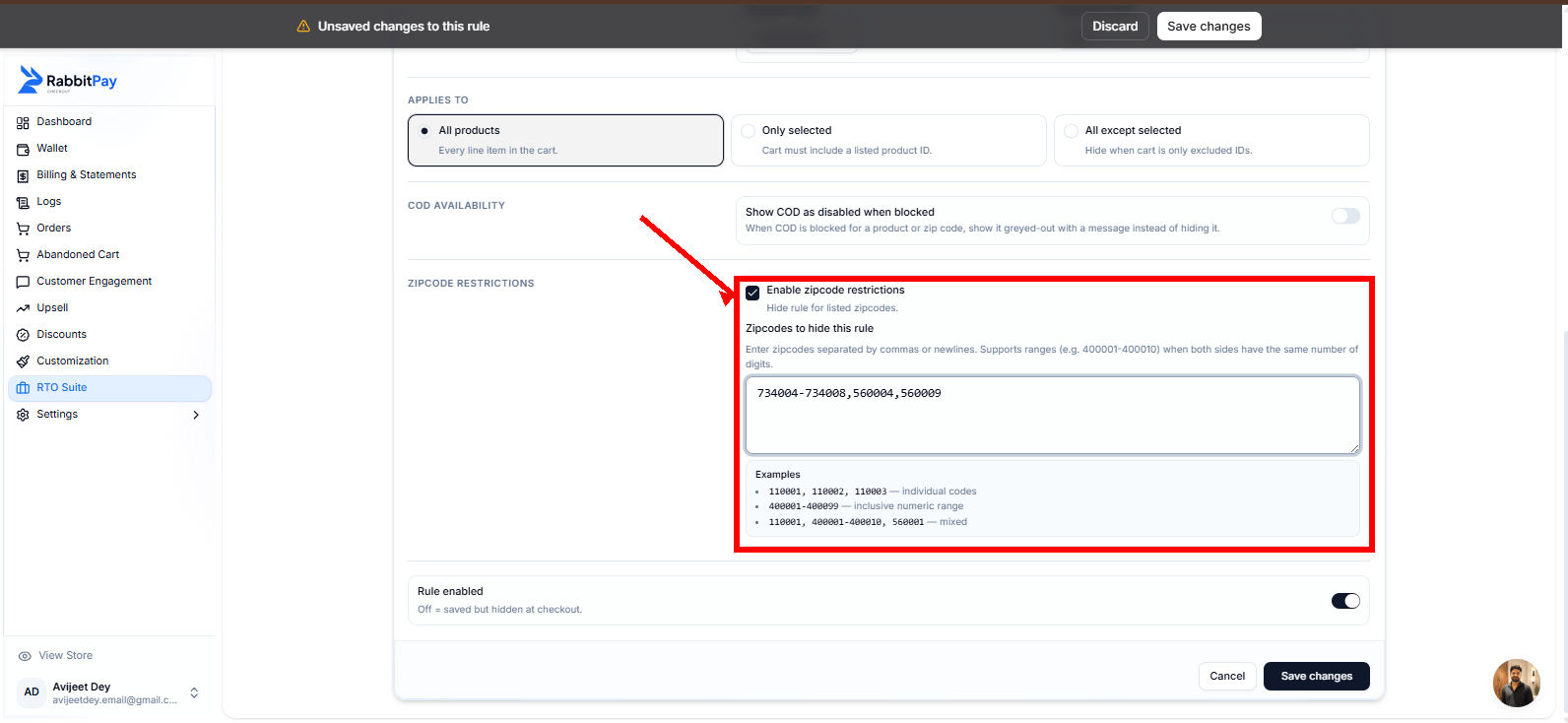 > **Tip:** You can highlight the entire **Zipcode Restrictions** section with a red border and use a red arrow pointing to **Enable Zipcode Restrictions**.
***
## Step 4: Add Zipcodes
You can enter individual zipcodes, zipcode ranges, or a combination of both.
| Type | Example |
| ------------------- | ------------------------------- |
| Individual Zipcodes | `560001, 560009, 734004` |
| Zipcode Range | `734004-734008` |
| Mixed | `734004-734008, 560004, 560009` |
Separate multiple zipcodes using commas or new lines. Zipcode ranges are also supported.
***
## Step 5: Save the Rule
1. Enable **Rule Enabled**.
2. Click **Save Changes**.
***
## Checkout Preview
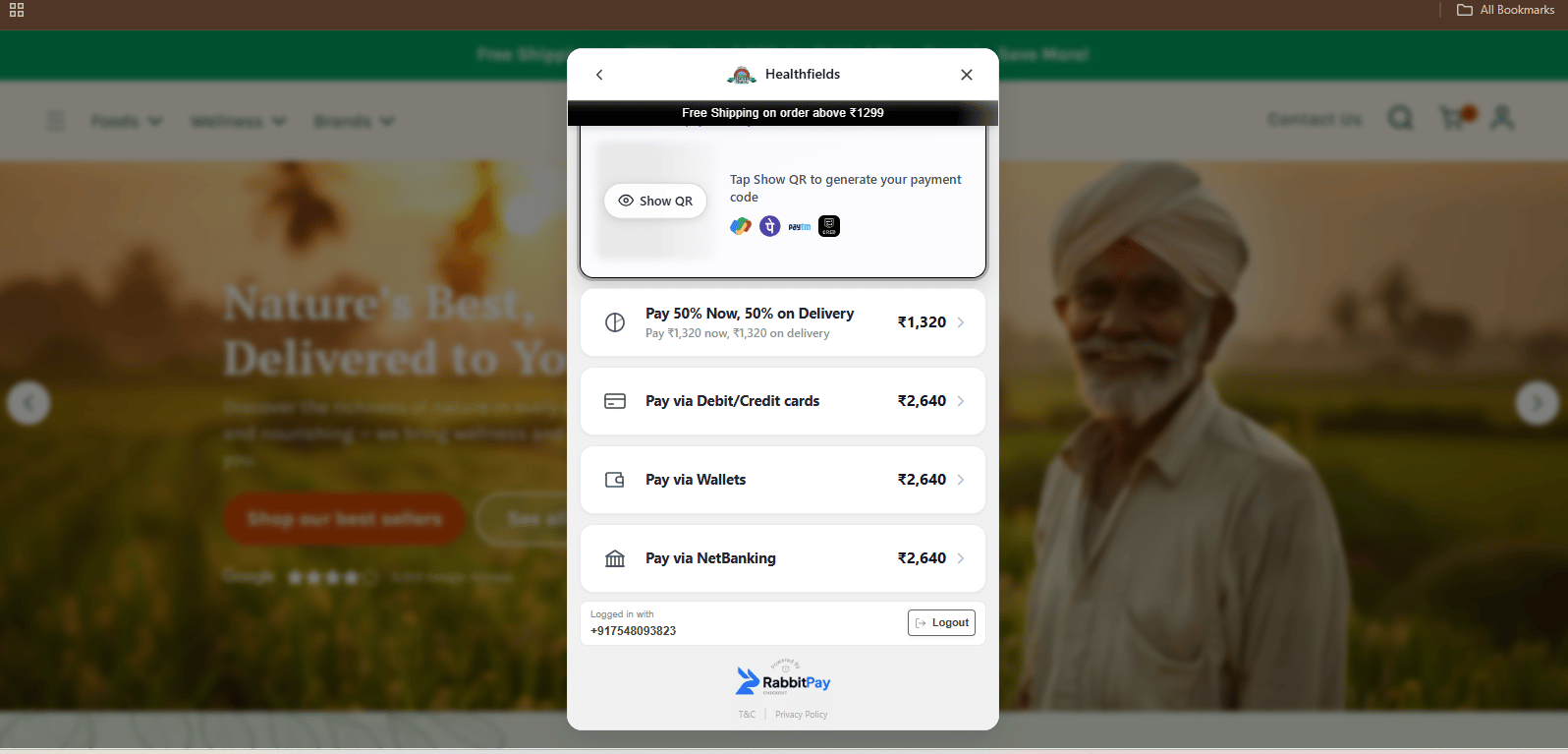
Customers whose delivery zipcode matches the configured restrictions will not see the configured payment rule during checkout.
> **Tip:** You can highlight the entire **Zipcode Restrictions** section with a red border and use a red arrow pointing to **Enable Zipcode Restrictions**.
***
## Step 4: Add Zipcodes
You can enter individual zipcodes, zipcode ranges, or a combination of both.
| Type | Example |
| ------------------- | ------------------------------- |
| Individual Zipcodes | `560001, 560009, 734004` |
| Zipcode Range | `734004-734008` |
| Mixed | `734004-734008, 560004, 560009` |
Separate multiple zipcodes using commas or new lines. Zipcode ranges are also supported.
***
## Step 5: Save the Rule
1. Enable **Rule Enabled**.
2. Click **Save Changes**.
***
## Checkout Preview
Customers whose delivery zipcode matches the configured restrictions will not see the configured payment rule during checkout.
 ***
## Example Configuration
| Setting | Value |
| -------------------- | ----------------------------- |
| Rule Name | Cash on Delivery |
| Amount Type | COD |
| Zipcode Restrictions | Enabled |
| Restricted Zipcodes | 734004–734008, 560004, 560009 |
| Rule Status | Enabled |
***
## Result
The payment rule is now restricted to the configured zipcodes.
In this example, since the rule is configured for **Cash on Delivery (COD)**, customers whose delivery zipcode matches the configured restrictions will **not** see the **Cash on Delivery (COD)** payment option during checkout. Customers from all other eligible zipcodes will continue to see the COD payment option normally.
***
## Example Configuration
| Setting | Value |
| -------------------- | ----------------------------- |
| Rule Name | Cash on Delivery |
| Amount Type | COD |
| Zipcode Restrictions | Enabled |
| Restricted Zipcodes | 734004–734008, 560004, 560009 |
| Rule Status | Enabled |
***
## Result
The payment rule is now restricted to the configured zipcodes.
In this example, since the rule is configured for **Cash on Delivery (COD)**, customers whose delivery zipcode matches the configured restrictions will **not** see the **Cash on Delivery (COD)** payment option during checkout. Customers from all other eligible zipcodes will continue to see the COD payment option normally.